
Tuesday, November 15, 2016

Tuesday, October 18, 2016
Real Property Title Registration and Name Transfer (Philippines)
STEP
1: Get A Certificate Authorizing Registration
- Go to the office of the Bureau of Internal Revenue (BIR)
- Once you are at the BIR, present the Deed of Absolute Sale (DOAS).
- Request for the computation of the Documentary Stamps and Capital Gains Tax.
- Then proceed to the designated bank and pay for the Documentary Stamps and the Capital Gains Tax. (Usually this is the Land Bank of the Philippines.)
- Go back to the office of the BIR and your Bank Receipt
- Finally, request for the issuance of Certificate Authorizing Registration (CAR)
STEP
2: Request Issuance of New Title
- Proceed to the Registry of Deeds and present the following documents: DOAS, CAR.
- Pay transfer tax and registration fees
- Request for the following:
- Issuance of new Title under buyer’s name with proper annotation
- Certified true copy of new title (owner’s copy)
- Certified true copy of new title (RD’s copy)
- DOAS stamped received
STEP
3: Pay Tax Declaration
- Proceed to the Assessor’s Office
- Present the new Title with your name
- Pay for the issuance of the new Tax Declaration under the buyer’s name
- Secure a copy of the new Tax Declaration
See link
Wednesday, October 12, 2016
BOOTABLE USB DRIVE CREATOR
Did you know you can create your own Bootable USB Drive even lack of tech knowledge?
You can try this Rufus 2.11
For more...
You can try this Rufus 2.11
For more...
 |
| See instruction here |
LTO TRAFFIC VIOLATION AND ADMINISTRATIVE FEES AND CHARGES as of October 2016
|
A. Violations in
Connection with Licensing
|
|
|
1. Driving without
License
|
1,500.00
|
|
2. Driving without
delinquent of expired license
|
400.00
|
|
3. Driving with
suspended or revoked or improper license
|
1,000.00
|
|
4. Failure to carry
Driver’s License
|
200.00
|
|
5. Failure to sign
Driver’s License
|
200.00
|
|
6. Driving under the
influence of liquor.
|
5,000.00
|
|
and two (2) months
suspension of driver’s license
|
5,000.00
|
|
for the 2nd offense
and three (3) months suspension of driver’s license
|
6,000.00
|
|
for subsequent
violations after the 2nd offense and six months suspension of driver’s
license; after 3rd offense automatic revocation of driver’s license
|
7,000.00
|
|
7. Driving under the
influence of drugs
Source: LTO
|
10,000.00
|
Wednesday, September 28, 2016
How To Upload Files On Blogger To Download
How to Upload Files For Download in Blogger

How to Upload Files to Download :
1. Go to Google Drive > Create > Folder and name the folder such as Blogger Uploads.
2. Open the folder which you created in first step.
3. Click on Upload Button and then click on Files button.
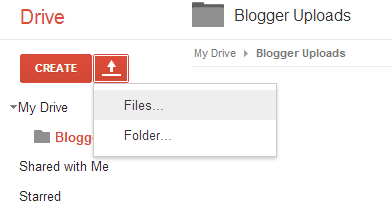
4. Now select the files which you want to upload in your blogger blog.
5. After file is uploaded,Right-click on it and click on Share button and then again click on Share button.

6. Now in Who Has Access change Shared Privately with Public On The Web and copy the Link To Share link on Notepad or any text processing software.

7. Just below the first link paste the following code in Notepad.
https://docs.google.com/uc?export=download&id=Your-File-ID


8. Now copy the File ID of first link and replace it with Your-File-ID in second link.
9. After that your Download link should look like below link.
https://docs.google.com/uc?export=download&id=0BzzsT-1SgLJOa0FKTkY2NlZuaGs
Adding Download Link to Blogger Post:
- Go To Blogger >> Create New Post >> Link
- Paste The Prepared Link in URL Box, Write "Download" in "Texts to Display" Box.

- Click "OK"
- Prepare The Post.
- Click on "Publish" Button.
- Done!
Repost
http://www.mybloggerbuzz.com/2014/04/upload-files-to-download-in-blogger.html
Subscribe to:
Posts (Atom)